Modded Lethal Company — Mod Manager, Loader & Best Mods Guide 2026

 Mhamed Ouzed
Set up modded Lethal Company with r2modman or the Thunderstore Mod Manager. Download the best mods, install a mod loader, and upgrade your moon runs instantly.
Modded Lethal Company — The Fastest Way to Set Up Mods in 2026
Lethal Company's mod scene exploded shortly after launch and hasn't slowed down — the Thunderstore mod repository currently hosts over 3,000 mods for the game, covering everything from new moon maps and enemy types to quality-of-life tools and full co-op UI overhauls. Getting into modded Lethal Company is easier than most PC games because the two primary mod managers — r2modman and the Thunderstore Mod Manager — handle BepInEx installation, load order, and mod updates automatically. You don't need to touch a single config file manually unless you want to. If you're deciding which PC games are worth building a mod list for, the Best Moddable PC Games guide on Gamesuki puts Lethal Company in excellent company alongside other deeply moddable titles. Mobile horror fans can get a fix from Granny or Five Nights at Freddy's while waiting for a mod session to load.
How to Set Up the Lethal Company Mod Manager
Option A — r2modman (Recommended)
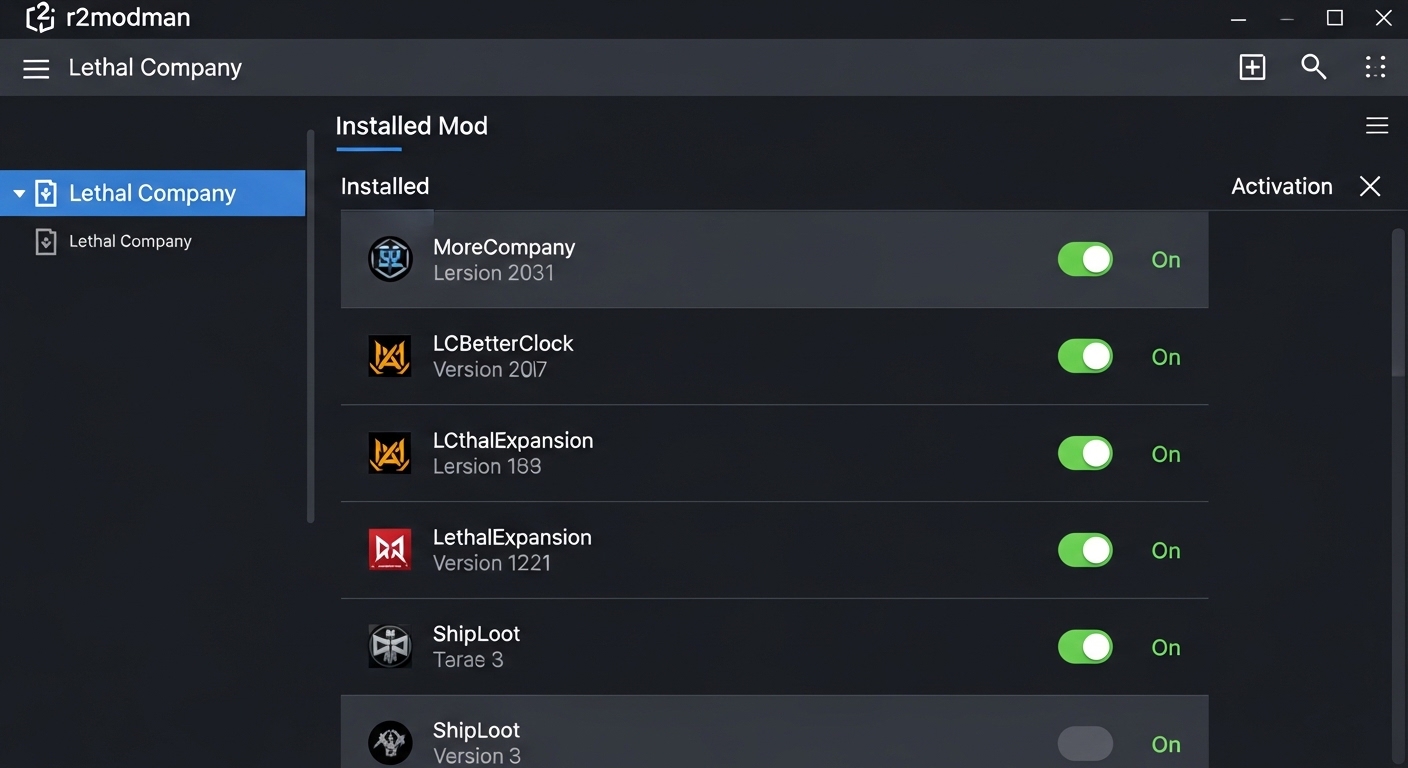
r2modman is the community-preferred Lethal Company mod launcher because it's lightweight, updates automatically, and handles BepInEx (the game's mod loader framework) as a dependency with zero manual setup. Download r2modman from Thunderstore.io, launch it, select Lethal Company from the game list, and create a new profile — profiles let you maintain separate mod lists for different playstyles or friend groups without conflicts. From the r2modman interface, click 'Online' to browse Thunderstore's full Lethal Company catalog and install mods with one click. The mod loader (BepInEx 5.4.x) installs automatically on first launch. After building your mod list, click 'Start Modded' to launch the game with all selected mods active. Vanilla launches through Steam remain unaffected.
Option B — Thunderstore Mod Manager
The Thunderstore Mod Manager is the browser-integrated alternative that lets you install mods directly from the Thunderstore website by clicking 'Install with Mod Manager' on any mod page. It shares the same profile system and BepInEx backend as r2modman — both apps are maintained by the same team and read the same mod installation directory. Choose Thunderstore Mod Manager if you prefer browsing mods in a web browser rather than inside an app. Either way, the Lethal Company mod loader (BepInEx) installs identically and both launchers support the same mods.
Top Lethal Company Mods to Download First
Start your modded Lethal Company session with these community essentials: MoreCompany (increases lobby size from 4 to 32 players with stable performance), LCBetterClock (displays a real-time clock on your visor so you don't miss the ship departure), ReservedItemSlot mods (adds dedicated slots for flashlight, walkie-talkie, and keys so they don't eat inventory space), and LethalThings (adds 10+ new purchasable items including an inflatable decoy and an extended ladder). These four mods alone transform the co-op experience without destabilizing the base game loop. For those who enjoy similar co-op experiences on Android, Among Us and Stumble Guys offer the same 'friends in chaos' energy on mobile.
Frequently Asked Questions
Do all players need the same mods to play together in modded Lethal Company?
For most content mods — new items, new moons, new enemies — yes, all players in the session need the same mod installed or they'll see desync errors (invisible objects, crashes on entering new areas). The exception is purely client-side mods like HUD tweaks, flashlight brightness changes, or cosmetic retextures — these only affect your screen and don't require matching files from other players. A good practice is to share your r2modman profile code with friends so everyone installs identical mod lists. r2modman generates a shareable profile code under Profile > Export Profile.
Is modded Lethal Company safe — will mods cause bans?
Lethal Company has no anti-cheat and no competitive ranked system — Zeekerss (the developer) has not issued any statements against modding, and the game's file structure is left fully accessible by design. Modding is safe and widely encouraged by the community. The only risk is mod conflicts causing crashes on your own machine, not account bans. Always download from Thunderstore.io to avoid third-party APK-style repackaging common on unofficial mod sites.
What is the Lethal Company mod loader and do I need to install it manually?
The Lethal Company mod loader is BepInEx — a widely used Unity game modding framework that acts as the bridge between the game's code and installed mods. You do not need to install it manually if you use r2modman or Thunderstore Mod Manager — both apps install BepInEx automatically as a dependency when you run Lethal Company modded for the first time. Manual BepInEx installation (dropping files into the game directory) is only necessary if you're building a custom setup outside of a mod manager, which is rarely needed.
Related articles
Browse all
Best Moddable PC Games: Top Games to Mod on Steam and Beyond in 2025
Discover the best moddable PC games with thriving mod communities — from Skyrim to RimWorld. Find the top Steam games for modding and get started today.

Best Stardew Valley Mods in 2026 — Top SDV Mods for Every Playstyle
Looking for the best Stardew Valley mods? From massive modpacks to hidden gems, this guide covers the top SDV mods for PC, with picks sorted by category and playstyle.
Control Company Mod, Storm 4 Mods & Northstar — Best PC Game Mods Guide
Discover the best Control Company mod, Storm 4 mods, and Northstar mods. This guide covers what each mod adds, how to install, and where to download safely.